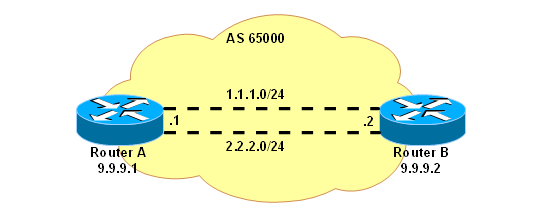
Network Diagram
Configuration
On Router A:# loopback interface /interface bridge add name=lobridge # addresses /ip address add address=1.1.1.1/24 interface=ether1 /ip address add address=2.2.2.1/24 interface=ether2 /ip address add address=9.9.9.1/32 interface=lobridge # ECMP route to peer's loopback /ip route add dst-address=9.9.9.2/32 gateway=1.1.1.2,2.2.2.2 # BGP /routing bgp instance set default as=65000 /routing bgp add name=peer1 remote-address=9.9.9.2 remote-as=65000 update-source=lobridgeOn Router B:
# loopback interface
/interface bridge add name=lobridge

# addresses
/ip address add address=1.1.1.2/24 interface=ether1
/ip address add address=2.2.2.2/24 interface=ether2
/ip address add address=9.9.9.2/32 interface=lobridge

# ECMP route to peer's loopback
/ip route add dst-address=9.9.9.1/32 gateway=1.1.1.1,2.2.2.1

# BGP
/routing bgp instance set default as=65000
/routing bgp add name=peer1 remote-address=9.9.9.1 remote-as=65000 update-source=lobridge

# a route to advertise
/routing bgp network add network=4.4.4.0/24
Results
Check that BGP connection is established:[admin@B] > /routing bgp peer print status
Flags: X - disabled
0 name="peer1" instance=default remote-address=9.9.9.1 remote-as=65000
tcp-md5-key="" nexthop-choice=default multihop=no route-reflect=no hold-time=3m
ttl=255 in-filter="" out-filter="" address-families=ip
update-source=lobridge default-originate=no remote-id=1.1.1.1
local-address=9.9.9.2 uptime=28s prefix-count=0 updates-sent=1
updates-received=0 withdrawn-sent=0 withdrawn-received=0 remote-hold-time=3m
used-hold-time=3m used-keepalive-time=1m refresh-capability=yes
as4-capability=yes state=established
Route table on Router A:
[admin@A] > /ip route print
Flags: X - disabled, A - active, D - dynamic,
C - connect, S - static, r - rip, b - bgp, o - ospf, m - mme,
B - blackhole, U - unreachable, P - prohibit
#      DST-ADDRESS        PREF-SRC        G GATEWAY                 DISTANCE INTER...
0 ADC  1.1.1.0/24         1.1.1.1                                   0        ether1
1 ADC  2.2.2.0/24         2.2.2.1                                   0        ether2
2 ADb  4.4.4.0/24                         r 9.9.9.2                 200      ether1
                                                                             ether2
3 ADC  9.9.9.1/32         9.9.9.1                                   0        lobridge
4 A S  9.9.9.2/32                         r 1.1.1.2                 1        ether1
                                          r 2.2.2.2                          ether2
[admin@A] > /ip route print detail
Flags: X - disabled, A - active, D - dynamic,
C - connect, S - static, r - rip, b - bgp, o - ospf, m - mme,
B - blackhole, U - unreachable, P - prohibit
0 ADC  dst-address=1.1.1.0/24 pref-src=1.1.1.1 interface=ether1 distance=0 scope=10

1 ADC  dst-address=2.2.2.0/24 pref-src=2.2.2.1 interface=ether2 distance=0 scope=10

2 ADb  dst-address=4.4.4.0/24 gateway=9.9.9.2 interface=ether1,ether2
       gateway-state=recursive distance=200 scope=40 target-scope=30
       bgp-local-pref=100 bgp-origin=igp received-from=9.9.9.2

3 ADC  dst-address=9.9.9.1/32 pref-src=9.9.9.1 interface=lobridge distance=0 scope=10

4 A S  dst-address=9.9.9.2/32 gateway=1.1.1.2,2.2.2.2 interface=ether1,ether2
       gateway-state=reachable,reachable distance=1 scope=30 target-scope=10
The route 4.4.4.0./24 is installed in Linux kernel now with two nexthops: 1.1.1.2 (on ether1) and 2.2.2.2 (on ether2).
Example with eBGP
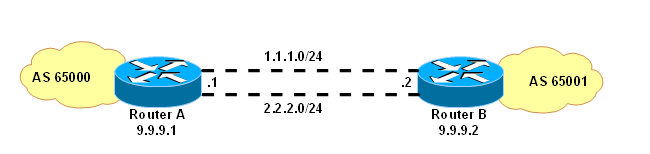
Network Diagram
Configuration
Here the example given above is further developed for eBGP case. By default, eBGP peers are required to be directly reachable. If we are using loopback interfaces, they technically are not, so multihop=yes configuration setting must be specified.On Router A:
/routing bgp instance set default as=65000
/routing bgp set peer1 remote-address=9.9.9.2 remote-as=65001 update-source=lobridge multihop=yes
On Router B:
/routing bgp instance set default as=65001
/routing bgp set peer1 remote-address=9.9.9.1 remote-as=65000 update-source=lobridge multihop=yes
Results
If we now print the route table on Router A, we see that the route from Router B is there, but it's not active:...
2 Db dst-address=4.4.4.0/24 gateway=9.9.9.2 interface="" gateway-state=unreachable
distance=20 scope=40 target-scope=10 bgp-as-path="65001" bgp-origin=igp
received-from=9.9.9.2
...
This is because eBGP routes are installed with lesser target-scope by default. To solve this, setup routing filter that sets larger target-scope:
/routing filter add chain=bgp-in set-target-scope=30
/routing bgp set peer1 in-filter=bgp-in
Or else, modify scope attribute of the static route:
/ip route set [find dst-address=9.9.9.2/32] scope=10Either way, the route to 4.4.4.0/24 should be active now:
2 ADb  dst-address=4.4.4.0/24 gateway=9.9.9.2 interface=ether1,ether2
       gateway-state=recursive distance=20 scope=40 target-scope=10
       bgp-as-path="65001" bgp-origin=igp received-from=9.9.9.2
Sumber : http://wiki.mikrotik.com/wiki/Manual:BGP_Load_Balancing_with_two_interfaces
Tidak ada komentar:
Posting Komentar